For latest version please follow this Liferay DXP
Saturday, 7 November 2020

Sunday, 19 February 2017
Liferay 7
Install liferay 7 in Eclipse Luna
Download liferay plugin update site( Liferay IDE 3.0.1-ga2 Archieved
Update-site) from the below link
Open Eclipse Go to HelpàInstall
New Software


Upload the liferay updated site in Archieve and enter Name
as Liferay .
Click ok and continue the liferay installation .Select the check box and finish it.
After liferay installation You can configure liferay server.
Goto àPreferences
à Server àRuntime Environments àchoose Liferay 7.x and
click next

After Browse… click
finish.
Start the server
Once server starts it will open URL as localhost:8080 in
browser with default configurations.
If you want to change the DB change here (or) finish with
default configuration and DB as hypersonic.
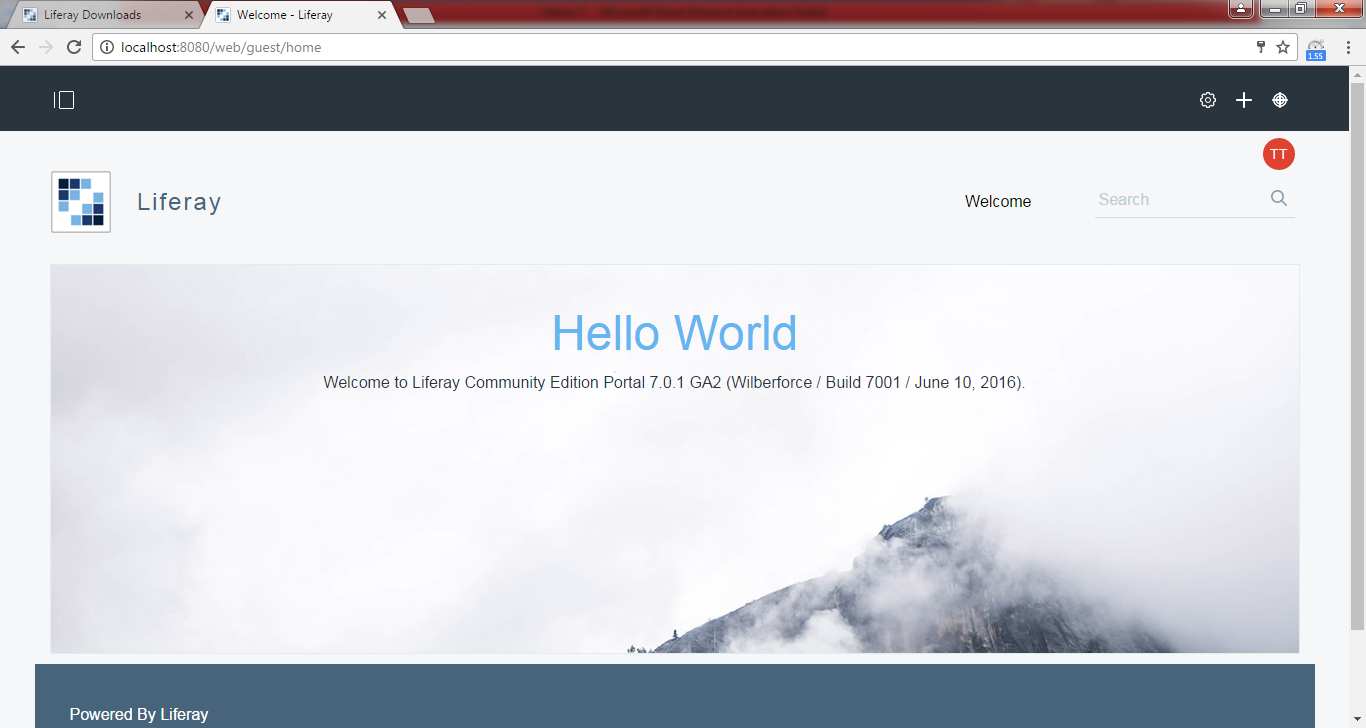
If everything goes well you can see the below screen.
Please upgrade to at least MySQL 5.6.4. The portal no
longer supports older versions of MySQL.
After configuring mysql as DB you may get the above error in
console if my sql version is below 5.6
So please try to upgrade the sql version and try.
Friday, 17 February 2017
Liferay 7
Steps for liferay 7 through
command prompt in windows
1)Install java 8 in your system
2) Path setting should be proper
For Example:
JAVA_HOME - C:\Program Files\Java\jdk1.8.0_101
JRE_HOME - C:\Program Files\Java\jdk1.8.0_101\jre
Based on your installation you can provide the path but
JRE_HOME should be inside jdk’s (JRE as mentioned above)
3)Download liferay 7 from the below path
Choose your version and download here
Extract the downloaded zip file
Open the command prompt
and run the below commands
If you are in C drive move to required path for Example
C:\Users\user>D:
D:\>cd D:\softwares\Liferay NEW\liferay-ce-portal-7.0-ga2\tomcat-8.0.32\bin
After entering into bin just start the server with startup.bat command
once if server starts It will come in browser as localhost:8080 with basic
configurations.
Enter name and email
id or continue with defaults as test@liferay.com.
Choose password and reminder question and finish it.
If page looks like the below diagram make sure your JRE path
once again and try.

If your path is proper then you can see the page as

Tuesday, 16 August 2016
liferay 6.2 features
Responsive Design
Improved in web content management
Dynamic Data Structures(Supports only few data types and limited form of data validation)
Multiple language support in structure field labels(Structures in WCM)
In Web Content Display we can create folder and we can move our webcontent display to that particular folders and also if we mouse over on approved it will display the name of the creator along with time(Ex: 4 minutes ago)
Recycle bin
Application Display Templates
Notification
My profile and dashboard is showing once if we click on firstname+lastname
Preview option os there to check for mobile,tablet,desktop and with custom pixel
Edit(Link) to edit some customizations
Work flow configuration(as default and single approver for few portlets(6)
Improved in web content management
Dynamic Data Structures(Supports only few data types and limited form of data validation)
Multiple language support in structure field labels(Structures in WCM)
In Web Content Display we can create folder and we can move our webcontent display to that particular folders and also if we mouse over on approved it will display the name of the creator along with time(Ex: 4 minutes ago)
Recycle bin
Application Display Templates
Notification
My profile and dashboard is showing once if we click on firstname+lastname
Preview option os there to check for mobile,tablet,desktop and with custom pixel
Edit(Link) to edit some customizations
Work flow configuration(as default and single approver for few portlets(6)
Thursday, 11 August 2016
liferay indexer hook
post processor indexer HookIndexer hook implements a post processing system on top of the existing indexer.
For example go to Users and Organizations and search based on type.
You wont get the result based on type.
To achieve this just follow the below steps.
Step 1 :
Create a liferay project and choose plugin type as hook and finish.
Step 2 :
Modify in liferay-hook.xml
<?xml version="1.0"?>
<!DOCTYPE hook PUBLIC "-//Liferay//DTD Hook 6.1.0//EN" "http://www.liferay.com/dtd/liferay-hook_6_1_0.dtd">
<hook>
<indexer-post-processor>
<indexer-class-name>com.liferay.portal.model.Organization</indexer-class-name>
<indexer-post-processor-impl>com.javaeasyforu.MyCustomPostIndexer</indexer-post-processor-impl>
</indexer-post-processor>
</hook>
Step 3 :
create a package and java class
docroot/WEB-INF/src ---->create a class as MyCustomPostIndexer
package com.javaeasyforu;
import com.liferay.portal.kernel.search.BaseIndexerPostProcessor;
import com.liferay.portal.kernel.search.Document;
import com.liferay.portal.kernel.search.Field;
import com.liferay.portal.model.Organization;
public class MyCustomPostIndexer extends BaseIndexerPostProcessor
{
public void postProcessDocument(Document document, Object object)throws Exception {
Organization orgEntity = (Organization) object;
String indexerOrgTitle = null;
try
{
indexerOrgTitle = orgEntity.getType();
}
catch (Exception e)
{
e.printStackTrace();
}
if (indexerOrgTitle.length() > 0)
{
document.addText(Field.TITLE, indexerOrgTitle);
}
}
}
Step 4 : Right click on project and deploy
Now go to control panel and click on Users and Organizations
Step 5 :
Search for Type and see the result
Note : It will effect only for new and update records but not for existing records. So edit for some organization and check the result.
Key
Point :
Eclipse is not opening properly
# A fatal error has been detected by the Java Runtime Environment
#
# SIGSEGV (0xb) at pc=0x00007f8e88aaa2a1, pid=7607, tid=140252668163840
Solution: After extracting eclipse you have file called config.ini inside configuration folder. Go there and add the below line at the end
org.eclipse.swt.browser.DefaultType=mozilla
Tuesday, 9 August 2016
difference between hook and ext
Hook EXT
Hot Deployable Not Hot Deployable
No need to Restart the server Need to restart the server
Maintenance is Easy Maintenance is difficult
Not overriding code directly It will replace the code directly
Undoing is easy Undoing is difficult
Note : We can deploy only one ext plugin per Liferay installation.
Key Point : To avoid multiple submit in form submission when it got refresh give the below line in liferay-portlet.xml
<action-url-redirect>true</action-url-redirect>
Key Point : To avoid multiple submit in form submission when it got refresh give the below line in liferay-portlet.xml
<action-url-redirect>true</action-url-redirect>
Liferay Custom Icons
In Liferay Search Container if you want to call your own image you can define as
<liferay-ui:search-container-column-text
name="Cancel">
<liferay-ui:icon
image="my-custom-icon" src="/PortletName/images/cancel.png"
/>
</liferay-ui:search-container-column-text>
copy your image in images folder and provide the path.
Key Point : If you want to reuse your custom portlet more than one time please give the below line in liferay-portlet.xml
<instanceable>true</instanceable>
copy your image in images folder and provide the path.
Key Point : If you want to reuse your custom portlet more than one time please give the below line in liferay-portlet.xml
<instanceable>true</instanceable>
Out of the box Portlets in Liferay
Out of the box portlets with plugin Ids
Plugin
ID Out of the box portets
2 Account Settings
3 Search
9 Admin
10 Address Book
11 Portal Directory
15 Web Content
16 Currency Converter
19 Message Boards
20 Documents and Media
23 Dictionary
25 Polls
26 Translator
27 Unit Converter
28 Bookmarks
29 My Sites
30 Network Utilities
31 Media Gallery
33 Blogs
34 Shopping
36 Wiki
39 RSS
48 IFrame
49 Site Redirector
54 Wiki Display
56 Web Content Display
58 Sign In
59 Polls Display
61 Loan Calculator
62 Web Content List
64 Recent Downloads
66 Web Proxy
67 Amazon Rankings
70 Password Generator
71 Navigation
73 Breadcrumb
77 Web Content Search
82 Language
83 Alerts
84 Announcements
85 Site Map
86 Portlet Configuration
88 Manage Pages
90 Portal
97 Quick Note
98 Software Catalog
99 Tags
100 Invitation
101 Asset Publisher
102 XSL Content
104 Update Manager
107 Page Comments
108 Page Ratings
110 Documents and Media Display
111 Plugin Installer
113 Portlet CSS
114 Recent Bloggers
115 Blogs Aggregator
116 Activities
118 Nested Portlets
121 Requests
122 Categories Navigation
124 Social
125 Users and Organizations
127 User Groups
128 Roles
129 Password Policies
130 Portal Settings
131 Monitoring
132 Plugins Configuration
133 Portlet Sharing
134 Sites
135 Portal Instances
136 Plugins Installation
137 Server Administration
139 Custom Fields
140 My Pages
141 Tags Navigation
142 Flags
143 Page Flags
144 Ratings
145 Dockbar
146 Page Templates
147 Categories
148 Tag Cloud
149 Site Templates
150 Workflow Tasks
151 Workflow
152 Workflow Configuration
153 My Workflow Tasks
154 Wiki
156 Site Pages
157 Submissions
158 My Submissions
161 Blogs
162 Message Boards
164 Fast Sign In
165 Site Settings
166 Dynamic Data Mapping
167 Dynamic Data Lists
169 Dynamic Data List Display
173 Recent Content
174 Site Memberships
175 Related Assets
176 License Manager
178 Mobile Device Rules
179 Social Activity
180 User Statistics
181 Group Statistics
182 Recycle Bin
183 Application Display Templates
184 Sites Directory
186 Friends Directory
187 Site Members Directory
188 My Sites Directory
190 Control Panel Home
3 Search
9 Admin
10 Address Book
11 Portal Directory
15 Web Content
16 Currency Converter
19 Message Boards
20 Documents and Media
23 Dictionary
25 Polls
26 Translator
27 Unit Converter
28 Bookmarks
29 My Sites
30 Network Utilities
31 Media Gallery
33 Blogs
34 Shopping
36 Wiki
39 RSS
48 IFrame
49 Site Redirector
54 Wiki Display
56 Web Content Display
58 Sign In
59 Polls Display
61 Loan Calculator
62 Web Content List
64 Recent Downloads
66 Web Proxy
67 Amazon Rankings
70 Password Generator
71 Navigation
73 Breadcrumb
77 Web Content Search
82 Language
83 Alerts
84 Announcements
85 Site Map
86 Portlet Configuration
88 Manage Pages
90 Portal
97 Quick Note
98 Software Catalog
99 Tags
100 Invitation
101 Asset Publisher
102 XSL Content
104 Update Manager
107 Page Comments
108 Page Ratings
110 Documents and Media Display
111 Plugin Installer
113 Portlet CSS
114 Recent Bloggers
115 Blogs Aggregator
116 Activities
118 Nested Portlets
121 Requests
122 Categories Navigation
124 Social
125 Users and Organizations
127 User Groups
128 Roles
129 Password Policies
130 Portal Settings
131 Monitoring
132 Plugins Configuration
133 Portlet Sharing
134 Sites
135 Portal Instances
136 Plugins Installation
137 Server Administration
139 Custom Fields
140 My Pages
141 Tags Navigation
142 Flags
143 Page Flags
144 Ratings
145 Dockbar
146 Page Templates
147 Categories
148 Tag Cloud
149 Site Templates
150 Workflow Tasks
151 Workflow
152 Workflow Configuration
153 My Workflow Tasks
154 Wiki
156 Site Pages
157 Submissions
158 My Submissions
161 Blogs
162 Message Boards
164 Fast Sign In
165 Site Settings
166 Dynamic Data Mapping
167 Dynamic Data Lists
169 Dynamic Data List Display
173 Recent Content
174 Site Memberships
175 Related Assets
176 License Manager
178 Mobile Device Rules
179 Social Activity
180 User Statistics
181 Group Statistics
182 Recycle Bin
183 Application Display Templates
184 Sites Directory
186 Friends Directory
187 Site Members Directory
188 My Sites Directory
190 Control Panel Home
Friday, 1 July 2016
Get Children of Children in Liferay structures and templates
Children
Levels(3 levels)

Sample Structure:
<?xml
version="1.0"?>
<root>
<dynamic-element
name="level1" type="text" index-type="keyword"
repeatable="true">
<dynamic-element
name="level2" type="text" index-type=""
repeatable="true">
<dynamic-element
name="level3" type="text" index-type=""
repeatable="false"/>
</dynamic-element>
</dynamic-element>
</root>
Template:
#foreach($i
in $level1.getSiblings())
#foreach($j
in $i.level2.getSiblings())
#foreach($k
in $j.level3.getSiblings())
<p>$i.data</p>
<p>$j.data</p>
<p>$k.data</p>
#end
#end
#end
Example:
output
will display based on your input values.
For Example If input is
level1: Karthik
level2: Reddy
level3: M
Output in Webcontent Display:
Karthik
Reddy
M
Key Point : In liferay service builder if there is no primary key it will throw java.lang.RuntimeException there is no primary key for entity EntityName
Key Point : In liferay service builder if there is no primary key it will throw java.lang.RuntimeException there is no primary key for entity EntityName
Thursday, 16 June 2016
liferay user related tables
If
we create User in Liferay the following tables will effect in DB
Contact_
User_
Users_Roles
The above three tables will effect in Data Base once if we create User .
Along with these options we have some more options for user.
Table Name Options for User if we go to control panel
Address Addresses
Phone Phone Numbers
Website Websites
EmailAddress Additional Email Addresses
Contact_ Social Network
(facebookSn,twitterSn,mySpaceSn)
Contact_ sms
(smsSn)
User_ openId
(openId)
AnnouncementsDelivery Announcements
User_ DisplaySetting
(languageId, timeZoneId,greeting)
User_ Comments
(comments)
For
Custom fields we have tables like
ExpandoColumn, ExpandoRow, ExpandoTable and ExpandoValue.
Here
if we have already custom fields we can give the values for those
fields and save
Key Point : At what time table will create in liferay when we are using liferay service builder???
Once if we build the services all classes and interfaces will create but after deploying the portlet only the related table will create in DataBase
Key Point : At what time table will create in liferay when we are using liferay service builder???
Once if we build the services all classes and interfaces will create but after deploying the portlet only the related table will create in DataBase
Monday, 9 May 2016
Embedding custom portlet in Webcontent liferay
Create Web content and click on source.
Enter the below line
Enter the below line
<p>
<runtime-portlet instance="4433" name="portlet_name" querystring="">
</runtime-portlet>
</p>
how to get name---->Go to control
panel---->Plugins Configuration---->copy plugin id and paste in
the above line mentioned as name=" "
For Example :
For Out of the box portlet Ids Please check in the below link
Out of the box portlets
116 (Out of the box portlet Id)--------> Activities
Key Points :
For Example :
<p>
<runtime-portlet instance="4433" name="116" querystring=""> </runtime-portlet>
</p>
For Out of the box portlet Ids Please check in the below link
Out of the box portlets
116 (Out of the box portlet Id)--------> Activities
Key Points :
If
we want to generate a finder for primary key in liferay service
builder the return type should be an entity if
return type is collection it will throw an error in persistance and
util.java with error as Duplicate parameter columnName.
Monday, 21 September 2015
Liferay AUI validator example
Liferay AUI Validations Using Custom Patterns
<%@ taglib uri="http://liferay.com/tld/ui" prefix="liferay-ui"%>
<%@ taglib uri="http://java.sun.com/portlet_2_0" prefix="portlet"%>
<%@ taglib uri="http://liferay.com/tld/aui" prefix="aui"%>
<%@ taglib uri="http://liferay.com/tld/ui" prefix="liferay-ui"%>
<%@page import="javax.portlet.PortletURL"%>
<portlet:defineObjects />
<portlet:actionURL name="saveEmployee"
var="saveEmployeeURL">
</portlet:actionURL>
<aui:form action="<%=saveEmployeeURL%>"
method="POST"
name="saveEmployeeForm" inlineLabels="true">
<aui:field-wrapper>
<aui:column columnWidth="15">
<label>Employee Name :<span style="color: red;"> *</span></label>
</aui:column>
<aui:column columnWidth="35">
<aui:input name="employeeName"
type="text" label=""
inlineLabel="true">
<aui:validator name="required"></aui:validator>
<aui:validator name="custom"
errorMessage="Name is Mandatory">
function (val, fieldNode, ruleValue)
{
var result = true;
if(val.length==0)
{
result=false;
}
return result;
}
</aui:validator>
<aui:validator name="custom"
errorMessage="Only Alphabets are allowed">
function (val, fieldNode, ruleValue)
{
var result = true;
var pattern=/[^a-z|^A-Z|^\s]/;
var check = val.match(pattern);
if(check!=null)
{
result=false;
}
val=$.trim(val);
$("#<portlet:namespace />employeeName").val(val);
return result;
}
</aui:validator>
<aui:validator name="minLength">2</aui:validator>
<aui:validator name="maxLength">80</aui:validator>
</aui:input>
</aui:column>
<aui:column columnWidth="15">
<label>Mobile :<span style="color: red;"> *</span></label>
</aui:column>
<aui:column columnWidth="35">
<aui:input type="text"
name="mobile" label=""
inlineLabel="true"
maxlength="10">
<aui:validator name="required"></aui:validator>
<aui:validator name="digits"
/>
<aui:validator name="minLength"
errorMessage="Please enter atleast 10 digits">10</aui:validator>
<aui:validator name="maxLength"
errorMessage="Please enter no more than 10 digits">10</aui:validator>
<aui:validator name="custom"
errorMessage="Please enter the valid mobile number">
function
(val, fieldNode, ruleValue)
{
var result = true;
var pattern=/^[1-9][0-9]+/;
var check = pattern.test(val);
if(check == false)
{
result=false;
}
val=$.trim(val);
$("#<portlet:namespace />mobile").val(val);
return result;
}
</aui:validator>
</aui:input>
</aui:column>
</aui:field-wrapper>
<br />
<aui:field-wrapper>
<aui:column columnWidth="15">
<label>Email :<span style="color: red;"> *</span></label>
</aui:column>
<aui:column columnWidth="35">
<aui:input type="text"
name="email" label="" inlineLabel="true">
<aui:validator name="required"></aui:validator>
<aui:validator name="email"></aui:validator>
<aui:validator name="custom">
function (val, fieldNode, ruleValue)
{
var result = true;
val=$.trim(val);
$("#<portlet:namespace />email").val(val);
return result;
}
</aui:validator>
</aui:input>
</aui:column>
<aui:column columnWidth="15">
<label>Company Name :<span style="color: red;"> *</span></label>
</aui:column>
<aui:column columnWidth="35">
<aui:input type="text"
name="companyName" label="" inlineLabel="true">
<aui:validator name="custom"
errorMessage="Please enter the valid company name">
function (val, fieldNode,
ruleValue)
{
var result = true;
var
pattern=/(?=.*[a-zA-Z])[a-zA-Z0-9 &@!#_\-\\\/\.]+/;
var check = pattern.test(val);
var checkValue = $("#<portlet:namespace />companyName").val();
if(check == false && checkValue)
{
result=false;
}
val=$.trim(val);
$("#<portlet:namespace />companyName").val(val);
return result;
}
</aui:validator>
</aui:input>
</aui:column>
</aui:field-wrapper>
<br />
<aui:field-wrapper>
<aui:column columnWidth="15">
<label>Password :<span style="color: red;"> *</span></label>
</aui:column>
<aui:column columnWidth="35">
<aui:input name="password1"
type="password" id="password1"
label=""
showRequiredLabel="<%=false%>">
<aui:validator name="required"
/>
<aui:validator name="equalTo">'#<portlet:namespace
/>password2'</aui:validator>
</aui:input>
</aui:column>
<aui:column columnWidth="15">
<label>Confirm Password :<span style="color: red;"> *</span></label>
</aui:column>
<aui:column columnWidth="35">
<aui:input name="password2"
type="password" id="password2"
label=""
showRequiredLabel="<%=false%>">
<aui:validator name="required"
/>
<aui:validator name="equalTo">'#<portlet:namespace
/>password1'</aui:validator>
</aui:input>
</aui:column>
</aui:field-wrapper>
<br />
<aui:field-wrapper>
<aui:column columnWidth="15">
<label>Pan Card Number :<span style="color: red;"> *</span></label>
</aui:column>
<aui:column columnWidth="35">
<aui:input name="panCardNumber"
type="text" label=""
inlineLabel="true">
<aui:validator name="custom"
errorMessage="Please enter the valid pan card number">
function (val, fieldNode,
ruleValue)
{
var result = true;
var
pattern=/^[A-Z]{5}\d{4}[A-Z]{1}$/;
var check = pattern.test(val);
var checkValue = $("#<portlet:namespace />panCardNumber").val();
if(check == false && checkValue)
{
result=false;
}
val=$.trim(val);
$("#<portlet:namespace />panCardNumber").val(val);
return result;
}
</aui:validator>
</aui:input>
</aui:column>
<aui:column columnWidth="15">
<label>Compensation :<b style="color: red;"> *</b></label>
</aui:column>
<aui:column columnWidth="35">
<aui:input name="compensation"
type="text" id="compensation"
label=""
inlineLabel="true">
<aui:validator name="custom"
errorMessage="Please enter the valid Compensation">
function (val, fieldNode, ruleValue)
{
var result = true;
var pattern
=/(^\d{0,4}\.\d{0,2})|(^\d{0,4})$/gm;
var check = pattern.test(val);
var checkValue = $("#<portlet:namespace />compensation").val();
if(check == false && checkValue)
{
result=false;
}
val=$.trim(val);
$("#<portlet:namespace />compensation").val(val);
return result;
}
</aui:validator>
</aui:input>
</aui:column>
</aui:field-wrapper>
<br />
<aui:field-wrapper>
<aui:column columnWidth="15">
<label>Experience :<b style="color: red;"> *</b></label>
</aui:column>
<aui:column columnWidth="35">
<aui:input name="experience"
id="experience" type="text" label=""
inlineLabel="true">
<aui:validator name="required"
/>
<aui:validator name="custom"
errorMessage="Please enter the valid Experience">
function (val, fieldNode, ruleValue)
{
var result = true;
var pattern
=/(((^([0-9]|[1-3][0-9]|4[0-9]))+(?:\.([0-9]|(?:[0-0][0-9]|[1-1][0-1]))){1,2})|(^([0-9]|[1-3][0-9]|4[0-9])))$/;
var check = pattern.test(val);
var checkValue = $("#<portlet:namespace />experience").val();
if(check == false && checkValue)
{
result=false;
}
val=$.trim(val);
$("#<portlet:namespace />experience").val(val);
return result;
}
</aui:validator>
</aui:input>
</aui:column>
<aui:column columnWidth="15">
<label>Postal Code :<b style="color: red;"> *</b></label>
</aui:column>
<aui:column columnWidth="35">
<aui:input name="postalCode"
id="postalCode" type="text" label="">
<aui:validator name="required"
/>
<aui:validator name="custom"
errorMessage="Enter the valid Postal Code">
function
(val, fieldNode, ruleValue)
{
var result = true;
var pattern=/^([1-9])([0-9]){5}$/;
var check = pattern.test(val);
if(check == false)
{
result=false;
}
val=$.trim(val);
$("#<portlet:namespace />postalCode").val(val);
return result;
}
</aui:validator>
</aui:input>
</aui:column>
</aui:field-wrapper>
<br />
<aui:column columnWidth="15">
</aui:column>
<aui:column columnWidth="25">
</aui:column>
<aui:column columnWidth="60">
<aui:button type="submit"
value="Submit" name="saveEmployeeForm"></aui:button>
</aui:column>
</aui:form>
<!-- Useful patterns -->
<!--
1)For Website
var
pattern=/^((http|https):[\/][\/]|www.)([\w-]+\.)+[\w-]+(\/[\w-
.\/?%&=]*)?/;
2)Pattern for numbers upto 200
var
pattern=/^(([0-9])|([0-9][0-9])|([0-1][0-9][0-9]))$/;
3)digits comma digits
var
pattern=/^\d+(,\d+)*$/;
4)IFSC code validation
var pattern=/[A-Z|a-z]{4}[0][\d]{6}$/;
5)Address validation
var pattern=/(?=.*[a-zA-Z])[a-zA-Z0-9
@!#,_\-\\\/\.]+/;
6)Capability validation
var pattern=/(?=.*[a-zA-Z])[a-zA-Z0-9
+&,#_\-\/\.]+/;
-->
Subscribe to:
Posts (Atom)